Falling Lemon
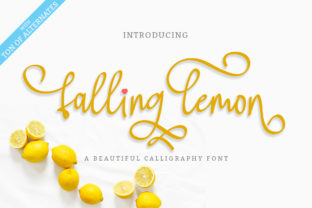
Falling Lemon is a natural handwritten font—manually written using a calligraphy pen, not generated by algorithm or traced from digital strokes. Its authenticity comes from slight inconsistencies in pressure, rhythm, and spacing: the subtle lift of the nib between letters, the gentle taper of downstrokes, the organic swell of curves. That’s not a flaw—it’s the signature of human handcraft. For designers, marketers, educators, and small business owners who rely on visual clarity and emotional resonance, Falling Lemon isn’t just another typeface. It’s a tool that bridges intention and impression—especially where warmth, approachability, or artisanal credibility matters.
Where Falling Lemon Fits in Your Creative Workflow
Falling Lemon enters your process most effectively when you’re moving from concept to expression—not at the start of brainstorming, and rarely at final export. Think of it as a *translation layer*: the point where strategy meets voice, where brand values become visible, and where messaging gains texture. You might sketch a logo idea in rough form, define your brand voice in a brief (“friendly but authoritative,” “playful yet trustworthy”), then reach for Falling Lemon to test how that voice lands visually. It’s equally useful during refinement—swapping in Falling Lemon to assess contrast with supporting sans-serif fonts, or checking legibility across sizes before committing to a t-shirt layout or social media banner.
For educators designing printable worksheets or course materials, Falling Lemon works well in headings or quote callouts—never body text, but precisely where you want to signal care, personality, or emphasis. Bloggers use it for pull quotes or newsletter headers to break visual monotony without sacrificing readability. Freelancers building pitch decks apply it selectively in section titles or client testimonials to reinforce sincerity and craft—qualities clients associate with deliberate, human-centered work.
Integration With Other Tools and Assets
Falling Lemon is a desktop font (OTF format), compatible with Adobe Creative Cloud apps (Illustrator, Photoshop, InDesign), Affinity Designer, Canva Pro (via upload), and most modern design software. It does not require special plugins or cloud subscriptions—just standard font installation. That makes it easy to embed into existing asset libraries, brand guidelines, or team design systems. If your team uses shared Figma files, you can install Falling Lemon locally and sync styling via text layers—no need to convert to outlines unless exporting static PDFs for print vendors who restrict embedded fonts.
Its real strength lies in how it complements other resources. Pair it with a clean, neutral sans-serif (like Inter, Lato, or Helvetica Now) for balance: Falling Lemon handles voice; the sans-serif handles structure. When used in logos, it often pairs best with custom-drawn icons or simple geometric shapes—not ornate illustrations—so the handwriting remains the focal point, not competing texture. For t-shirt designs, consider how fabric texture interacts with fine strokes: Falling Lemon’s medium weight holds up well on cotton, but avoid ultra-thin alternates for screen printing unless working with high-resolution output.
Practical Implementation Tips
- Start with purpose, not aesthetics. Ask: “What feeling should this convey?” If the answer is “professional distance” or “technical precision,” Falling Lemon isn’t the right fit. Reserve it for moments where humanity matters—welcome emails, handmade product tags, workshop invitations, or personal branding assets.
- Leverage the alternates intentionally. Falling Lemon includes over 80 stylistic alternates—different ‘a’, ‘g’, ‘y’ forms, swash capitals, and ligatures. Don’t enable them all at once. Pick two or three that support your message: a looping ‘f’ for fluidity, a tapered ‘t’ for softness, or a connected ‘st’ ligature for cohesion. Use OpenType features in Illustrator or InDesign to access them without manual swapping.
- Test hierarchy early. Handwritten fonts can blur typographic roles if overused. Set your main headline in Falling Lemon, then use a contrasting sans-serif for subheads and body copy. This maintains scannability while preserving character. On websites, use it only in
or hero banners—not navigation or buttons—unless you’ve tested loading performance and fallback behavior. - Check spacing at scale. Kerning in Falling Lemon is optimized for display sizes (24pt and up). At smaller sizes (under 16pt), letters may appear cramped. Adjust tracking manually in design tools—or better, reserve it for larger applications where its expressiveness shines: signage, packaging, presentation slides.
Preparation and Long-Term Usability
Before integrating Falling Lemon into recurring projects, spend 15 minutes exploring its full character set—not just the alphabet, but punctuation, numerals, and language support (it covers Latin-based languages including extended diacritics). Note which glyphs feel consistent and which require minor adjustment. Save presets in your design app: a “Falling Lemon Headline” style with optimal tracking, baseline shift, and OpenType features enabled. That eliminates decision fatigue each time you use it.
Consistency over time depends less on the font itself and more on how you govern its use. Small business owners benefit from documenting rules like: “Falling Lemon is used only in primary logo lockups and email headers—not on invoices or legal footers.” Educators can standardize it for “student-facing inspirational quotes only.” These boundaries prevent dilution and maintain its impact.
Quality control is straightforward: if a word looks “off,” it’s likely due to automatic ligature substitution clashing with adjacent characters. Turn off discretionary ligatures for problem words, or swap in a manual alternate. No need to abandon the font—just refine usage. And because Falling Lemon is manually drawn, it ages well. Unlike trend-driven script fonts that feel dated in 12–18 months, its grounding in traditional calligraphy gives it staying power across branding refreshes.
Real-World Workflow Examples
A freelance illustrator launching a new workshop series uses Falling Lemon in the event title banner (“Sketch & Story: A Weekend Workshop”) and in handwritten-style pull quotes on promotional flyers. They pair it with Inter for all logistical details—dates, locations, pricing—ensuring clarity without sacrificing charm. Before sending files to the printer, they outline the Falling Lemon text to guarantee no rendering surprises.
A boutique skincare brand updates its product labels. Instead of redesigning everything, they keep their minimalist layout and typography—but swap the ingredient list header from Helvetica Bold to Falling Lemon Medium. The change signals craftsmanship without altering shelf presence. Internally, they add a note in their brand guide: “Falling Lemon is approved for front-of-pack emphasis only. Never used in regulatory text.”
An educator building a digital course uploads Falling Lemon to Canva Pro and creates a reusable slide template: Falling Lemon for lesson titles, Roboto for explanations, and a consistent color block for key takeaways. Because students see this pattern across modules, the font becomes part of the course’s visual rhythm—not decoration, but orientation.
Falling Lemon doesn’t replace planning or strategy. It supports them—by giving voice to decisions already made, by reinforcing tone already defined, and by helping others quickly grasp intent through visual cues that feel intentional, not incidental. Its value isn’t in being everywhere, but in being *right there*: where a human touch changes how something is received, remembered, or trusted.