The Lantak
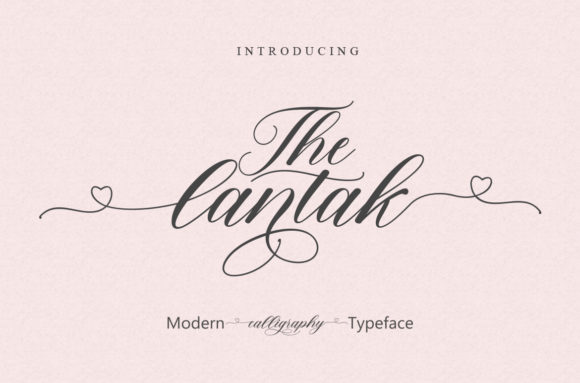
The Lantak is a modern calligraphy font designed for clarity, rhythm, and expressive energy—not just ornamentation. It bridges the warmth of hand-drawn lettering with the precision required in professional digital workflows. Unlike decorative scripts that sacrifice legibility or scalability, The Lantak maintains strong contrast, consistent spacing, and balanced weight distribution across its character set. That makes it functional first—then distinctive.
It fits most naturally into the visual refinement phase of a project: after messaging is locked, layout structure is established, and brand alignment is confirmed—but before final export or delivery. Think of it as the last intentional stroke in a sequence of decisions, not the starting point. Using The Lantak too early—before tone, audience, and medium are clear—can lead to misaligned emphasis or unnecessary revision later.
Where The Lantak Adds Real Value in Your Workflow
The Lantak shines where personality meets purpose: invitation headers, social media quote graphics, course module titles, boutique packaging accents, podcast episode thumbnails, and short-form video text overlays. Its energy works best when applied selectively—not as body copy, but as a signal. A single line in The Lantak can anchor an otherwise minimal composition, guiding attention without competing with content.
For educators building slide decks or worksheet headers, The Lantak adds approachability without sacrificing professionalism. Freelancers pitching creative services often use it in proposal cover pages or service cards—subtly communicating craftsmanship and care. Small business owners integrate it into limited-edition product labels or seasonal campaign banners, reinforcing uniqueness without overcomplicating production.
Before You Apply The Lantak: Alignment Checks
Before dropping The Lantak into your file, ask three practical questions:
- Is the message emotionally aligned? The Lantak conveys confidence, warmth, and intention—not urgency, formality, or austerity. If your goal is “trust through restraint,” another typeface may serve better.
- Is the output medium compatible? It renders cleanly at 24pt and above on screen and in print. Below 18pt, fine details (like tapered terminals or subtle flourishes) begin to soften—so avoid using it for captions, footnotes, or mobile interface labels.
- Is your color contrast sufficient? Because of its flowing strokes and moderate stroke variation, The Lantak benefits from high-contrast pairings. Avoid light gray on white or pale pastels on off-white backgrounds unless you’re testing at actual size and viewing distance.
Integration With Common Tools and Assets
The Lantak is available in OpenType (.otf) and web font formats (WOFF2), making it compatible with Adobe Creative Cloud apps, Figma, Canva (via upload), and modern CSS environments. In Figma, enable “smart layers” and use auto-layout with The Lantak headings to maintain consistent padding and vertical rhythm across templates. In Adobe Illustrator, activate OpenType features like stylistic alternates or swash characters only when needed—most default glyphs are optimized for balance and readability.
When pairing with other fonts, choose companions with stable x-heights and neutral personalities: Inter, Manrope, or IBM Plex Sans work reliably. Avoid pairing The Lantak with other script fonts—or with ultra-condensed or ultra-bold sans-serifs—as contrast becomes chaotic rather than complementary. One heading in The Lantak + one clean supporting font is enough. More than that dilutes focus.
For branding systems, treat The Lantak as a secondary display face—not a primary logo font—unless your brand identity intentionally centers around expressive handwriting. Even then, test it across applications: embroidered patches, engraved signage, and small-scale app icons will all behave differently than large-format digital banners.
Practical Implementation Tips for Consistency
Consistency with The Lantak isn’t about rigid rules—it’s about repeatable judgment. Start by defining two usage boundaries in your design system:
- Size & context ceiling: “The Lantak appears only at 28pt or larger in print, and 32px or larger on screen—and only in headings, quotes, or standalone words.”
- Color constraint: “Only black, charcoal (#2D2D2D), or brand primary color—never gradients, transparency, or duotones—unless tested and approved per campaign.”
These aren’t arbitrary limits. They prevent accidental misuse during fast-turnaround work—like last-minute social posts or client revisions—while preserving the font’s impact. Teams using shared Figma libraries or Adobe CC Libraries can embed these guidelines directly in layer naming conventions (e.g., “H1_Lantak_32px_Black”) to reinforce discipline without overhead.
Also consider licensing scope. The Lantak is licensed per user or per domain, depending on format. If you’re embedding it in a client-facing web app or SaaS dashboard, verify that your license covers dynamic rendering—not just static exports. Many users overlook this until deployment, causing unexpected fallbacks or legal exposure.
Long-Term Use and Quality Control
Fonts age—not technically, but perceptually. What feels fresh and energetic in Q2 may read as dated or overused by Q4 if deployed without variation or restraint. To sustain The Lantak’s effectiveness over time:
- Rotate its application: Use it for Q3 workshop titles, then shift to Q4 holiday campaign headers—not every monthly newsletter.
- Document usage outcomes: Note where engagement spiked (e.g., Instagram carousel slides with The Lantak headlines saw 12% more saves) versus where it underperformed (e.g., email subject lines had no open-rate lift).
- Re-audit annually: Pull all assets using The Lantak, sort by date, and assess whether execution still matches intent. Often, the font hasn’t changed—the surrounding design has become busier or less intentional.
That audit also reveals compatibility shifts. For example, newer versions of iOS or Android sometimes render OpenType features differently. A flourish that appeared crisp in 2023 may subtly clip in 2025’s system updates—so keep a test file open with live previews across devices, not just desktop mockups.
Real-World Workflow Example: Launching a Digital Course
A freelance educator preparing a new online course follows this sequence:
Week 1: Finalizes learning objectives and module structure → chooses core body font (Inter) and establishes typographic hierarchy.
Week 2: Designs slide master and worksheet templates → tests The Lantak at 36px for module titles and 28px for key concept headers.
Week 3: Builds promotional assets → applies The Lantak only to hero banner text (“Master Visual Storytelling”) and testimonial pull-quotes; avoids it in bullet points or CTA buttons.
Week 4: Prepares launch email sequence → uses The Lantak exclusively in the header image, not in HTML text, to ensure consistent rendering.
Post-launch: Tracks which assets drove sign-ups—finds that landing page headers with The Lantak converted 8% higher than those with alternate fonts, confirming strategic placement.
No step depends on The Lantak alone—but each step benefits from its deliberate, human-centered presence.
Ultimately, The Lantak works because it supports decision-making, not replaces it. It doesn’t solve vague goals like “look more creative” or “stand out”—it helps execute precise ones: “guide attention to the core idea,” “signal care in craft,” or “reinforce authenticity without overstatement.” Used with that clarity, it stays useful, adaptable, and quietly effective—across projects, platforms, and years.