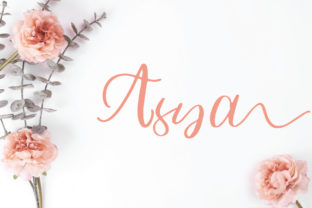
Asya: Elegant Script Font for Meaningful Design
Asya isn’t just another script font—it’s a deliberate, graceful tool built for clarity and charm. With its smooth, confident strokes and subtle contrast, Asya balances readability with personality in a way few script fonts achieve. It doesn’t shout; it invites. Whether you're crafting a wedding invitation, refining a boutique logo, or designing an Instagram story for your small business, Asya brings warmth without sacrificing professionalism.
Why Asya Stands Out Among Script Fonts
Many script fonts sacrifice legibility for flair—swashes that tangle, inconsistent spacing, or letterforms that blur together at smaller sizes. Asya avoids those pitfalls. Its lowercase letters flow naturally but maintain distinct shapes; its capitals are refined, not theatrical. The spacing is carefully tuned—not too tight to cause crowding, not too loose to break rhythm. That means Asya works where others falter: on product packaging viewed at arm’s length, in email headers scanned on mobile, or as part of a multi-font branding system.
It’s also versatile by design. While rooted in calligraphic tradition, Asya avoids heavy ornamentation. That makes it adaptable across contexts—from minimalist editorial layouts to richly textured social media graphics. You don’t need to “make it work.” It’s already built to integrate.
Creative Uses That Deliver Real Results
Here’s where Asya shines—not in theory, but in practice:
- Small business branding: A handmade soap maker used Asya for their logo lockup alongside a clean sans-serif (like Inter or Poppins). The contrast communicated craft and care without seeming fussy—and customers consistently described the brand as “trusted” and “thoughtful.”
- Digital course materials: An educator teaching creative writing uses Asya for section headers in her PDF workbooks. It adds visual breathing room between topics while keeping tone approachable—not academic, not childish, but human-centered.
- Printed event collateral: A wedding planner pairs Asya with a light serif for ceremony programs. The script handles names and titles elegantly; the serif carries body text. Guests notice the cohesion—not the fonts themselves.
- Social media storytelling: A freelance photographer overlays Asya on muted landscape shots for Instagram carousels. Because the font has strong x-height and open counters, it remains legible even over busy backgrounds—no heavy drop shadows required.
How Different Creators Can Apply Asya Thoughtfully
Designers appreciate Asya’s OpenType features—standard ligatures, discretionary swashes, and alternate characters. Use them selectively: a single swash on the first letter of a headline adds polish; overusing them dilutes impact. Try pairing Asya with a neutral, highly legible sans-serif for UI elements or captions—this keeps interfaces both expressive and functional.
Marketers and entrepreneurs can leverage Asya to reinforce brand voice—not just aesthetics. If your messaging centers on authenticity, calm, or intentionality, Asya supports that quietly. Avoid using it for CTAs like “Buy Now” or “Sign Up”—its strength lies in invitation, not urgency. Instead, apply it to value-driven statements: “Hand-poured in small batches,” “Designed for slow mornings,” or “Where curiosity begins.”
Bloggers and content creators find Asya especially effective in visual storytelling. Use it sparingly but purposefully: pull quotes in Asya stand out in long-form posts; chapter dividers in digital zines gain quiet authority; newsletter banners feel personal without being informal. Just ensure line height stays generous—1.4–1.6x works well—to preserve readability on screens.
Educators and publishers benefit from Asya’s balance of familiarity and distinction. Students respond more positively to handouts with Asya headings than generic scripts—they register as intentional, not decorative. For children’s activity books or mindfulness journals, Asya conveys gentleness without infantilizing. Pair it with a friendly, highly readable body font (e.g., Nunito or Lato) and keep paragraph widths narrow for comfort.
Practical Tips for Stronger Outcomes
Start simple. Before layering effects or stacking type, test Asya at real-world sizes: 24px for web headlines, 18pt for printed posters, 14pt for brochure subheads. Notice where spacing feels off—and adjust tracking manually if needed. Default settings aren’t always optimal.
Respect hierarchy. Asya excels at top-of-page roles: logos, hero text, chapter titles. Let other fonts handle supporting roles—body copy, captions, data labels. This isn’t limitation; it’s focus. When every element has clear responsibility, designs feel calmer and communicate faster.
Test color contrast. Script fonts can recede visually, especially in light grays or pastels. Ensure text meets WCAG AA standards (4.5:1 minimum against background) for accessibility—and for broader readability across devices. Dark charcoal on off-white often works better than black on white with Asya, softening contrast while preserving clarity.
Consider licensing early. Asya is available in desktop, web, and app formats. If you’re building a client website or launching a mobile app, confirm the license covers your use case. Many creators overlook this until launch day—don’t let licensing become a last-minute bottleneck.
Not Every Project Needs Asya—And That’s Okay
Asya isn’t a universal fix. It won’t suit high-energy tech startups, urgent healthcare campaigns, or dense technical documentation. That’s not a flaw—it’s fidelity. Great typography serves intent, not trends. Ask yourself: Does this project benefit from warmth? From pause? From elegance that feels earned, not applied?
If yes, Asya offers consistency without repetition. Its character set includes thoughtful alternates—not just flourishes, but practical variants for tighter lines or balanced word shapes. That means you can refine, not replace, your layout when something feels slightly off.
Ultimately, Asya supports decisions—not replaces them. It rewards attention to detail, respects the viewer’s time, and gives creative work a grounded sense of voice. Whether you’re sketching ideas on paper or fine-tuning a Figma file, it’s a tool that responds to intention. Not every font does that.