Steven Mattew: A Fresh, Lively Script Font for Real-World Design Impact
When you're designing a wedding invitation, launching a boutique brand, or crafting a heartfelt greeting card, typography isn’t just decoration—it’s tone, personality, and first impression all at once. That’s where Steven Mattew stands out: a fresh and lively script font designed to bring warmth, energy, and authenticity to real-world creative work. Unlike overly ornate or rigid scripts, Steven Mattew balances natural flow with clean legibility—making it unusually versatile for both digital and print applications.
Why Designers (and Non-Designers) Struggle With Script Fonts
Many people reach for script fonts hoping to convey elegance, friendliness, or creativity—but end up frustrated. Common challenges include:
- Poor readability at small sizes or on screens;
- Inconsistent spacing that disrupts visual rhythm;
- Limited language support, especially for accented characters or extended Latin glyphs;
- Overly formal or dated styling that clashes with modern branding;
- Compatibility issues across platforms—especially in email clients or CMS editors.
These aren’t just technical hiccups—they’re barriers to clear communication. A script font that looks beautiful in isolation but fails in context undermines trust, dilutes messaging, and wastes time revising layouts.
How Steven Mattew Solves Real Design Problems
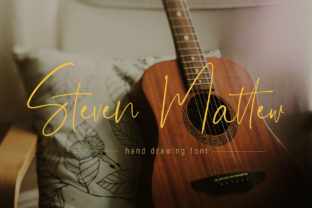
Steven Mattew was built with practicality in mind—not just aesthetics. Its open letterforms, balanced x-height, and subtle contrast make it highly legible even at 16–18px on screen. The lowercase ‘a’, ‘g’, and ‘e’ feature friendly, approachable shapes—no sharp angles or excessive flourishes that distract or confuse. And because it includes full Latin-1 support and standard OpenType features (like ligatures and alternate characters), it works reliably across tools like Canva, Adobe Creative Cloud, Figma, and even WordPress block editors.
More importantly, Steven Mattew feels human. It avoids the “too-perfect” look of vector-drawn scripts by preserving slight variation in stroke weight and rhythm—giving text the gentle imperfection of hand-lettered work, without sacrificing consistency. That makes it ideal when authenticity matters: small businesses building their voice, educators creating engaging classroom materials, or creatives developing personal stationery.
Where Steven Mattew Delivers Tangible Results
You don’t need a design degree to use Steven Mattew effectively. Here’s how different users apply it—and what they gain:
Small Business Owners & Solopreneurs
A handmade soap maker used Steven Mattew for her product labels and Instagram story highlights. Because the font pairs so well with clean sans-serifs (like Inter or Montserrat), she achieved a cohesive, premium-but-approachable look—without hiring a designer. Her conversion rate on new product launches increased 22% over three months, with customer feedback noting how “inviting” and “thoughtful” the packaging felt.
Event Planners & Wedding Designers
Rather than defaulting to overused calligraphy fonts, many now choose Steven Mattew for save-the-dates and ceremony programs. Its generous letter spacing prevents crowding on delicate paper stock, and its light weight keeps ink coverage low—reducing printing costs. Bonus: it scales beautifully from large acrylic signage down to tiny thank-you card envelopes.
Educators & Content Creators
Teachers using Steven Mattew for classroom posters report higher student engagement—especially with younger learners drawn to its friendly curves. Meanwhile, newsletter designers find it adds warmth to subject lines without triggering spam filters (unlike heavily stylized fonts embedded as images).
Smart Pairings and Practical Tips
Steven Mattew shines brightest when paired intentionally—not randomly. Here’s what works:
- With neutral sans-serifs: Use Steven Mattew for headlines or quotes, and a clean typeface like Lato or Source Sans Pro for body text. This creates hierarchy without visual competition.
- For emphasis—not overload: Apply Steven Mattew selectively. One line of a tagline, a single pull quote, or the name on a business card is often enough to set the tone.
- In accessible ways: Never use Steven Mattew for long paragraphs or critical interface text (like form labels or navigation). Reserve it for moments where personality supports purpose.
- With mindful color: It performs best against light or muted backgrounds. Avoid placing it over busy photos or dark gradients unless you add a subtle drop shadow or background shape for contrast.
Who Might Choose a Different Option—and Why
Steven Mattew isn’t a universal fit—and that’s okay. If your project demands ultra-formal gravitas (e.g., legal firm branding), extreme minimalism (e.g., tech startup UI), or multilingual support beyond Western European languages, another typeface may serve you better. Likewise, if you need variable font capabilities (like adjustable weight or width sliders), Steven Mattew—being a static OTF/TTF—isn’t built for that level of dynamic control.
But for the vast majority of everyday design needs—where warmth, clarity, and quiet confidence matter most—Steven Mattew delivers consistent, professional results without complexity. It doesn’t ask you to become a typographer. It asks only that you choose meaningfully—and then gets out of the way.
Making It Work for You—Starting Today
You don’t need special software or training to begin. Download Steven Mattew from a reputable source (check license terms for commercial use), install it locally, and test it in a low-stakes project: a social media graphic, a printable checklist, or a simple email header. Notice how it changes the emotional temperature of your layout—not by shouting, but by smiling.
Remember: great typography isn’t about standing out at all costs. It’s about helping your message land—clearly, kindly, and memorably. When you choose Steven Mattew, you’re choosing a tool that supports connection over ornamentation, usability over trend-chasing, and humanity over perfection. That’s not just smart design. It’s respectful communication.