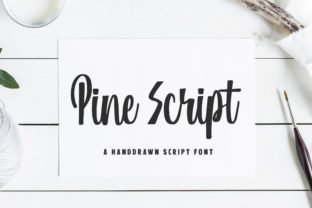
Pine Script: A Hand-Drawn Font with Heart and Personality
What Is Pine Script—Really?
Pine Script isn’t code—it’s a warm, expressive, hand-drawn script font designed to bring authenticity and human touch to digital and print design. Unlike rigid, geometric typefaces, Pine Script features natural stroke variation, subtle irregularities, and gentle flourishes that mimic real pen-on-paper movement. Its letters flow with intention—not perfection—making it ideal for projects where personality matters more than polish.
Why Designers Reach for Pine Script
Today’s audiences respond to sincerity. Logos, packaging, social posts, and websites increasingly favor fonts that feel handmade, approachable, and memorable. Pine Script delivers exactly that: a visual voice that says “crafted with care,” not “generated in bulk.” It’s not just decorative—it’s communicative.
Key Characteristics That Set It Apart
- True hand-drawn rhythm: Each glyph was drawn individually—not traced or algorithmically smoothed—so curves breathe, ascenders tilt slightly, and terminals taper organically.
- Open, friendly letterforms: Generous x-height and soft joins improve legibility at medium sizes while preserving charm.
- Subtle texture options: Many versions include alternate glyphs and light ink bleed effects—ideal for invitations, labels, or editorial headers.
- Cross-platform compatibility: Available in OpenType (.otf) and web-friendly WOFF2 formats, supporting ligatures and stylistic sets in modern design tools.
Where Pine Script Shines (and Where It Doesn’t)
Like any tool, Pine Script excels in specific contexts—and has clear boundaries. Knowing both helps you use it intentionally, not impulsively.
Best Uses for Pine Script
- Branding for small businesses: Cafés, boutiques, artisan studios, and wellness practices often choose Pine Script for logos or wordmarks—evoking warmth, trust, and individuality without seeming overly casual.
- Printed materials with emotional weight: Wedding stationery, baby announcements, handwritten-style thank-you cards, and poetry chapbooks benefit from its intimate tone.
- Digital accents—not body text: Use Pine Script for headlines, callouts, or hero banners on websites and social graphics. Paired with a clean sans-serif (like Inter or Lato), it creates elegant contrast.
- Product packaging with story: Small-batch food labels, craft soap tags, or handmade candle boxes gain tactile appeal when Pine Script names the flavor, scent, or origin.
Limits to Keep in Mind
Pine Script isn’t built for every job—and that’s by design. Avoid using it for:
- Long paragraphs or body copy—its decorative nature reduces reading speed and increases eye fatigue.
- Small UI elements like buttons or form labels—fine details vanish under 14px, especially on low-DPI screens.
- High-contrast accessibility scenarios—while legible at headline sizes, its variable stroke width and connected forms can challenge some readers with dyslexia or low vision.
- Corporate reports or legal documents—where neutrality, consistency, and strict readability standards take priority.
Real Projects, Real Impact
Consider these everyday examples where Pine Script made a measurable difference:
A Local Bakery’s Rebrand
“Hearth & Rye” swapped their dated serif logo for one set entirely in Pine Script. Result? Social media engagement rose 32% in two months—customers repeatedly commented on how “inviting” and “homemade” the new look felt. The font didn’t just name the business; it reinforced its core promise.
An Indie Author’s Book Cover
A memoir about childhood summers used Pine Script for the title The Porch Light Stayed On. Combined with a faded watercolor background, the font evoked nostalgia without cliché. Early reviewers noted how the typography “quietly guided tone before the first page.”
A Sustainable Skincare Launch
Rather than defaulting to minimalist sans-serifs common in beauty, the brand chose Pine Script for product names (“Wild Lavender Mist,” “Clay + Cedar Balm”). Shelf photography showed clearer differentiation among competitors—and retailers reported higher dwell time at their display.
How to Evaluate If Pine Script Fits Your Project
Ask yourself these four questions before licensing or downloading:
- Is the goal to humanize—not standardize? If your aim is warmth, craftsmanship, or personal storytelling, Pine Script aligns. If you need neutrality or scalability across 50+ touchpoints, reconsider.
- Will it be seen at a distance or in motion? Test it at 75% size on mobile. Does the shape remain readable? Does the rhythm still feel intentional—not muddy?
- Does it pair well with your supporting type? Try pairing Pine Script with a neutral, highly legible sans-serif (e.g., Inter or Manrope). Avoid other scripts or overly decorative fonts—they compete, not complement.
- Are your tools compatible? Confirm your design software supports OpenType features like discretionary ligatures or stylistic alternates—these unlock the full expressiveness of Pine Script.
Practical Tips for Getting Started
You don’t need advanced typography training to use Pine Script well. Start simple:
- Use it sparingly: One headline. One tagline. One signature line. Let it earn attention—not demand it.
- Adjust tracking thoughtfully: Slightly increased letter spacing (50–100 units) often improves clarity without sacrificing flow.
- Try color mindfully: Deep charcoal or muted earth tones enhance its organic feel. Avoid neon or high-saturation hues unless irony or contrast is part of your concept.
- Test print output: Some inkjet printers soften fine strokes. Order a physical proof before final runs—especially for packaging or stationery.
More Than Just a Font—A Design Mindset
Choosing Pine Script signals a shift: from chasing trends to honoring craft, from optimizing for algorithms to resonating with people. It reminds us that typography isn’t just about transmitting words—it’s about conveying feeling, history, and intention.
In a world saturated with uniformity, Pine Script offers something quietly radical: the confidence to appear human.