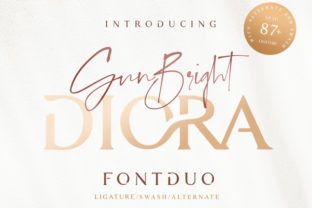
Diora Duo: Where Script Elegance Meets Serif Authority
Diora Duo isn’t just a font pairing—it’s a deliberate design decision with functional weight. It consists of two complementary typefaces: Diora, a refined, slightly modulated script with graceful terminals and consistent rhythm; and Diora Serif, a warm, humanist serif with open counters, gentle contrast, and generous x-height. Together, they form a cohesive typographic system designed for clarity, hierarchy, and quiet confidence—not flashiness.
For professionals who rely on visual communication—whether drafting a client pitch deck, designing an ebook cover, publishing a newsletter, or branding a small business—the pairing matters because it directly affects how information is received, trusted, and retained. Diora Duo works where tone and legibility intersect: when you need warmth without informality, distinction without distraction, and structure without rigidity.
How Diora Duo Fits Into Real Workflows
Unlike decorative fonts that sit at the periphery of a project, Diora Duo integrates into core workflow phases—before, during, and after execution. Its value emerges not in isolation but through context-aware application.
Before a project begins, Diora Duo helps define voice and scope. When sketching brand guidelines for a new coaching business, for example, applying Diora for headlines (“Your Next Chapter Starts Here”) and Diora Serif for body copy (“We support intentional growth through structured reflection and weekly accountability”) immediately surfaces whether the intended tone—approachable yet grounded—lands as planned. This isn’t aesthetic polish; it’s early-stage alignment checking. If the script feels too casual or the serif too stiff, adjustments happen before assets are built.
During execution, Diora Duo supports consistency across formats. A freelance educator creating a workshop handout might use Diora for section headers (“Reflection Prompts”, “Key Takeaways”) and Diora Serif for all explanatory text, captions, and footnotes. Because both fonts share proportional spacing, optical sizing behavior, and baseline alignment, switching between them in tools like Figma, Adobe InDesign, or even Google Docs (via uploaded web fonts) requires no manual kerning or vertical repositioning. That saves minutes per page—and hours across multi-page deliverables.
After delivery, Diora Duo contributes to long-term recognition. Readers encountering the same pairing across a blog post, email signature, and printed workbook begin subconsciously associating that rhythm with your work. It becomes part of your visual grammar—not through repetition alone, but because the pairing behaves predictably across media and scale.
Compatibility and Practical Integration
Diora Duo was designed with interoperability in mind. Both fonts support Latin Extended-A, include OpenType features like stylistic alternates and ligatures (useful for avoiding awkward letter collisions in the script), and render cleanly from 12 pt to 72 pt. They’re also optimized for variable font axes where applicable—meaning weight and width can be adjusted smoothly without swapping files.
This matters when working across platforms. For instance:
- In Notion, where custom fonts require browser extensions or CSS injection, Diora Serif serves reliably as body text while Diora remains reserved for high-impact headings—keeping load times low and readability high.
- In Canva, both fonts are available via the Pro library and behave consistently across templates, making brand-aligned social graphics faster to produce without manual font substitution.
- In web development, loading both as a single variable font file (if supported) or as two lightweight WOFF2 files ensures fast rendering. Pairing them with system-safe fallbacks (e.g., font-family: "Diora", cursive; followed by "Diora Serif", Georgia, serif;) maintains hierarchy even if custom fonts fail to load.
No special plugins or licensing tiers are needed for basic use—but if you’re embedding Diora Duo in client-facing SaaS dashboards or white-labeled reports, verify your license covers web app usage. Most standard desktop + web licenses do, but enterprise deployments may require additional coverage.
Implementation Tips That Prevent Rework
Even strong type pairings falter without intention. Here’s what prevents common missteps:
- Reserve Diora for hierarchy—not decoration. Use it only for primary headlines, quotes, or short labels (max 3–5 words). Avoid long paragraphs, captions, or data tables. Its strength lies in emphasis, not endurance.
- Match color contrast intentionally. Diora’s thin strokes demand higher contrast against backgrounds than Diora Serif. Test at 100% zoom: if Diora appears faint or blurry next to the serif, increase its weight slightly or darken the color by 5–10%.
- Align baselines—not descenders. Diora’s script has longer descenders than Diora Serif’s. When placing them side-by-side (e.g., in a logo lockup or masthead), align their baseline—not their bottom edges—to preserve visual cohesion.
- Use Diora Serif for accessibility-critical text. Its open apertures and clear letterforms meet WCAG AA contrast requirements more readily than many scripts. Reserve it for instructions, error messages, and legal disclaimers—even if Diora feels more “on-brand.” Clarity trumps style when comprehension is non-negotiable.
When to Choose Diora Duo Over Other Pairings
Diora Duo excels in contexts where warmth, credibility, and subtle distinction matter more than boldness or trendiness. Compare it to alternatives:
- Against Playfair Display + Montserrat: Diora Duo offers more organic flow and less geometric rigidity—ideal for personal brands, wellness content, or literary projects where mechanical precision feels out of place.
- Against Great Vibes + Lora: Diora Duo provides tighter spacing control and better cross-platform rendering. Great Vibes often requires manual tracking adjustments; Diora doesn’t.
- Against custom hand-lettered + sans-serif combos: Diora Duo delivers comparable personality without the cost or time investment of bespoke illustration—making it viable for solopreneurs and small teams shipping regularly.
It’s not the right choice for high-energy tech startups, gaming interfaces, or data-dense dashboards. But for educators launching online courses, therapists building trust through website copy, publishers designing author bios, or consultants refining proposal templates—Diora Duo delivers measurable improvement in perceived authority and reader engagement.
Sustaining Consistency Over Time
Long-term use depends less on the fonts themselves and more on how you embed them into your systems. Start simple:
- Create a shared typography reference doc (PDF or Notion page) showing approved sizes, weights, and use cases—e.g., “H1 = Diora Bold, 36pt / Body = Diora Serif Regular, 18pt / Captions = Diora Serif Light, 14pt.”
- Build reusable templates—in Figma, Canva, or Word—with Diora Duo pre-loaded and styled. Name layers clearly (“Diora Headline”, “Diora Serif Body”) so others (or future-you) don’t second-guess intent.
- Set up a quick test: paste the same sentence into three versions—one with Diora only, one with Diora Serif only, one with both. Read aloud. Does the dual-voice version feel more dimensional? If not, revisit weight or spacing—not the pairing itself.
Diora Duo won’t fix weak messaging or poor layout. But when applied with discipline, it quietly elevates execution—supporting clarity, reinforcing voice, and reducing friction between idea and delivery. That’s not ornamentation. It’s infrastructure.