Selfila: Where Elegance Meets Expressive Typography
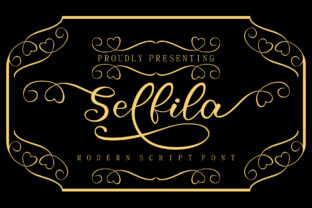
Imagine a font that doesn’t just say something—but sings it. That’s the experience of working with Selfila: an incredibly stunning script font crafted for designers, storytellers, and brands who believe typography should carry soul as much as structure. More than decorative flair, Selfila is a tool of intention—designed to elevate ideas, soften digital edges, and add unmistakable warmth to visual communication.
What Makes Selfila Stand Out?
At its core, Selfila is a richly detailed script font built around expressive swashes—those graceful, extended strokes that curve, loop, and flourish with purpose. Unlike generic handwriting fonts, Selfila’s swashes are not afterthoughts; they’re thoughtfully integrated into letterforms, offering multiple stylistic alternates per character. This means “A” isn’t just one shape—it’s a family of options, each suited to different contexts: bold opening statements, delicate closing flourishes, or rhythmic word connections.
Its design balances confidence and charm. The baseline rhythm feels natural—not rigidly mechanical nor overly casual—so text flows like practiced penmanship, not auto-generated mimicry. Letters connect smoothly where appropriate, yet retain clarity even at smaller sizes (down to 24–36pt in print or high-res digital displays). And because Selfila was drawn with real-world use in mind, spacing and kerning were fine-tuned to prevent awkward gaps or collisions—especially critical when setting names, quotes, or short headlines.
Key Characteristics That Matter
- Natural Swash Variety: Each uppercase and many lowercase letters include at least two swash variants—some upward-reaching, others descending or looping sideways—giving designers genuine typographic flexibility.
- OpenType Features Ready: Selfila supports standard OpenType features like contextual alternates, ligatures, and discretionary swashes—accessible directly in Adobe apps, Affinity Suite, and modern web design tools.
- Warm, Human Texture: Subtle irregularities in stroke weight and terminal endings avoid sterile perfection—evoking authenticity without sacrificing legibility.
- Cross-Platform Friendly: Available in both .OTF and .TTF formats, Selfila works reliably across macOS, Windows, and web environments (with proper licensing).
Who Benefits Most From Selfila?
Selfila isn’t meant for body copy or data tables—and that’s by thoughtful design. Its strength lies in moments of emphasis, identity, and emotional resonance. Here’s where it shines:
Creatives & Designers
Whether crafting a boutique wedding invitation suite or refining a brand’s launch campaign, designers turn to Selfila when they need typography that conveys craftsmanship and care. Its swashes pair beautifully with clean sans-serifs (like Montserrat or Inter) for contrast, or stand alone on textured backgrounds—think linen paper mockups, soft watercolor overlays, or minimalist Instagram story frames.
Small Business Owners & Entrepreneurs
A handmade soap label, a local café’s chalkboard menu header, or a photographer’s signature watermark—these aren’t just details. They’re micro-expressions of brand voice. Selfila helps small businesses communicate warmth, artistry, and approachability without needing a full branding agency. Used sparingly (e.g., logo lockups, social bios, or email headers), it adds polish that feels personal, not polished-over.
Content Creators & Educators
Bloggers, course creators, and podcast hosts often overlook how much tone their visuals set before a single word is read. A Selfila-styled quote graphic or episode title card instantly signals thoughtfulness and aesthetic intention—encouraging deeper engagement. Teachers using Canva or Google Slides have found Selfila especially effective for classroom posters, award certificates, or student project banners that celebrate individuality.
Real-World Uses—Beyond the Obvious
Here’s how people are putting Selfila to work in ways that surprise even seasoned typographers:
- Animated Logos: Designers export individual Selfila letters as vector paths, then animate swash entrances in After Effects—creating elegant, bespoke intros for YouTube channels or client presentations.
- Embroidery & Vinyl Cuts: Because Selfila’s outlines remain clean and scalable, crafters use it for digitized embroidery files and Cricut/Silhouette projects—especially for monogrammed towels, tote bags, or nursery wall art.
- Web Headers with CSS Control: Using
@font-faceandfont-feature-settings, developers activate specific swashes via CSS—allowing dynamic headline treatments that respond to user interaction (e.g., hover-triggered flourishes). - Book Covers & Chapter Openers: Authors self-publishing on Amazon KDP or IngramSpark use Selfila for titles and drop caps—adding literary sophistication while staying within platform-safe font guidelines.
Things to Keep in Mind Before You Use It
Like any expressive tool, Selfila delivers best when matched to the right job. Consider these practical realities:
- Legibility Threshold: Selfila excels at sizes 36pt and above in print—or 48px+ on screen. Avoid using it for paragraphs, captions under images, or mobile navigation menus.
- Licensing Clarity: Selfila is a premium font. Free versions or “cracked” downloads lack support, updates, and legal protection—especially important for commercial clients or e-commerce stores. Always verify license scope (desktop, web, app, or extended use) before purchase.
- Swash Overload Risk: Too many flourishes in one line can feel busy or dated. Start simple: enable swashes only on first/last letters of a word, or use them exclusively for initials and accents.
- Pairing Matters: Selfila thrives alongside restrained companions. Try pairing it with geometric sans-serifs (Poppins), neutral serifs (Lora), or even subtle monospaced fonts (JetBrains Mono) for unexpected contrast.
Is Selfila Right for Your Next Project?
Ask yourself three questions:
- Is this about impact—not information? If your goal is to stop scrolling, evoke feeling, or reinforce a brand’s artisanal ethos, Selfila is likely a strong fit.
- Do you control the environment? Selfila performs best where you control typography rendering—static PDFs, branded websites, printed materials. Avoid embedding it in third-party platforms with limited font support (e.g., basic email builders or legacy CMS themes).
- Are you willing to edit intentionally? Great Selfila usage involves selecting swashes deliberately—not applying them globally. If you enjoy refining details, this font rewards patience. If you prefer “set-and-forget” solutions, consider alternatives with simpler structures.
In short: Selfila isn’t background music—it’s the soloist stepping forward. It asks for attention, offers distinction, and repays thoughtful use with unforgettable presence. Whether you're naming a new product, designing a keepsake, or simply reimagining how your voice appears in the world, Selfila gives you a way to speak with grace, confidence, and unmistakable character.
Ready to explore further? Check official font previews, test sample layouts in your preferred design tool, and compare how Selfila interacts with your existing brand palette. When typography feels less like decoration and more like dialogue—that’s when you’ll know it’s the right choice.