Gaston Villa: A Luxurious Script Font
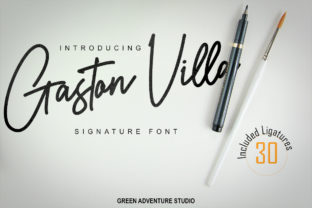
Gaston Villa is a refined, high-contrast script font that balances elegance with quiet confidence. It’s not just decorative—it’s engineered for legibility at scale, with graceful swashes, subtle terminals, and consistent rhythm across weights and characters. Designed with real-world use in mind, Gaston Villa avoids the fragility of overly ornate scripts while retaining unmistakable sophistication. That duality—luxury grounded in utility—is why designers, marketers, educators, and small business owners reach for it when they need typography that communicates both care and clarity.
What Makes Gaston Villa Stand Out
Unlike many script fonts that sacrifice function for flair, Gaston Villa maintains strong x-heights, open counters, and generous spacing—making it surprisingly versatile. Its lowercase ‘g’, ‘y’, and ‘f’ feature elegant descenders without compromising line spacing. Uppercase letters include optional swashes that activate contextually or manually, giving users precise control over formality and emphasis. The font includes standard ligatures, discretionary ligatures, and stylistic alternates, allowing nuanced expression without switching families.
It’s also carefully hinted for screen use—so whether you’re designing an Instagram Story headline, a printed wedding invitation, or a boutique product label, Gaston Villa renders cleanly across devices and resolutions. That reliability matters: you don’t want your brand voice to blur on mobile or vanish in a PDF export.
Creative Applications That Work—Not Just Look Good
Think beyond “pretty headings.” Gaston Villa shines where tone and trust intersect:
- Brand identity systems: Paired with a clean sans-serif (like Inter, Poppins, or Montserrat), Gaston Villa anchors logos, wordmarks, or monogrammed packaging for luxury skincare, artisanal food, or independent publishing. Example: A small-batch coffee roaster uses Gaston Villa for its name on bags and tasting notes, then switches to a neutral sans for origin details and brewing instructions—creating hierarchy without visual noise.
- Digital content: In email headers, blog post titles, or course module labels, Gaston Villa adds warmth without sacrificing scannability. Use it at 28–36px for H2s on desktop; reduce tracking slightly for tighter lines on mobile.
- Printed collateral: Wedding suites, gallery announcements, or workshop certificates benefit from its tactile presence. Try letterpress printing with slight ink spread—it enhances the contrast naturally built into the design.
- Educational materials: Teachers and course creators use Gaston Villa for section dividers or quote callouts in slide decks or handouts. Its rhythm guides the eye without competing with core content.
Adapting Gaston Villa Across Audiences and Platforms
How you apply Gaston Villa depends less on the font itself—and more on your audience’s expectations and your medium’s constraints.
For entrepreneurs launching a lifestyle brand: Use Gaston Villa sparingly but intentionally—on your logo lockup and hero banner only. Avoid body text. Pair it with a highly readable sans-serif and limit color contrast to two tones (e.g., charcoal + cream) to reinforce premium simplicity.
For freelance designers building client assets: Offer two versions of a logo—one with swashes for social bios or signage, one without for favicons or app icons. This shows foresight and saves revisions later.
For educators or nonprofit communicators: Gaston Villa works well in advocacy materials where warmth builds connection—think donor thank-you cards or community event posters. Just ensure all critical information (dates, locations, links) appears in a legible supporting typeface.
For bloggers and content creators: Use Gaston Villa for featured quote graphics—but always overlay the quote in plain text as alt text and caption. Screen readers won’t interpret stylized glyphs, so accessibility isn’t optional; it’s part of responsible design.
Practical Tips for Consistent, Effective Use
Even great tools need thoughtful handling. Here’s how to keep Gaston Villa working for you—not against you:
- Respect hierarchy: Gaston Villa belongs in display roles—headlines, pull quotes, short labels. Never use it below 18px for body copy, and avoid justified alignment in multi-line blocks; uneven spacing can disrupt readability.
- Test contrast early: On light backgrounds, use #2D2D2D or deeper for optimal legibility—not pure black unless you’re printing. On dark backgrounds, opt for off-white (#F8F7F5) instead of full white to soften glare.
- Limit swash density: Too many flourishes in one line create visual clutter. Activate swashes selectively—on first or last letters—or use them only in standalone words like “Handcrafted” or “Est. 2021.”
- Check licensing scope: Gaston Villa is available in web, desktop, and app licenses. If you’re embedding it in a SaaS dashboard or client-facing tool, confirm your license covers dynamic rendering—not just static exports.
- Stay consistent across touchpoints: Use the same weight (Regular or Medium), same tracking value (+20–+40 for headlines), and same swash settings across your website, social templates, and print files. Small variances compound quickly.
Why It Fits Real Creative Work—Not Just Aesthetic Trends
Gaston Villa doesn’t chase trends—it supports intention. You won’t see it trending on Pinterest mood boards every six months, but you will see it quietly elevating brands that prioritize authenticity over algorithmic appeal. It’s the kind of typeface that feels considered, not curated. That’s valuable when your audience is saturated with visual noise and short on patience.
Whether you’re a freelancer refining your portfolio, a teacher designing a classroom newsletter, or a founder naming your first product line—Gaston Villa gives you room to express craft without overcomplicating. It asks for restraint, rewards precision, and delivers polish that reads as human-made, not AI-generated.
Start simple: pick one project where tone matters as much as information—your next email header, a new service page title, or a personal stationery set. Apply Gaston Villa there. Adjust tracking. Test on phone and tablet. Then ask: does it feel like *you*, just clearer? If yes, you’ve found its place. If not, iterate—not because the font failed, but because your intent is still sharpening. That’s where real design work begins.