Larest: A Modern Sans Serif That Balances Charm and Clarity
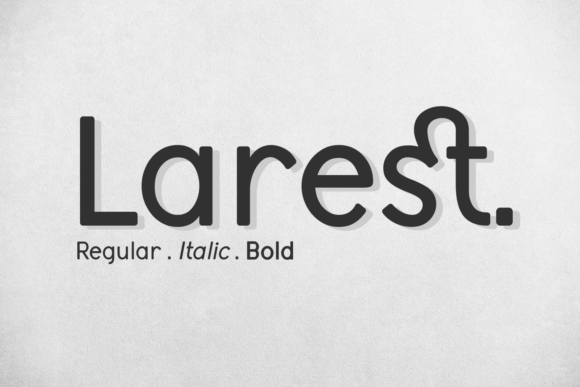
Larest isn’t just another clean font—it’s a thoughtfully crafted sans serif that bridges casual warmth and quiet sophistication. Designed for readability without sacrificing personality, it works as comfortably in a slide deck headline as it does in a hand-signed wedding invitation or a minimalist product label. Its open letterforms, consistent rhythm, and subtle stroke contrast make it highly legible at small sizes—yet its refined proportions lend authority to larger displays. People reach for Larest when they want typography that feels intentional but never intimidating, professional but never stiff.
Assuming “Modern” Means “Universal”—and Overlooking Context
One of the most common missteps is treating Larest as a one-size-fits-all solution simply because it looks sleek and contemporary. While its versatility is real, it’s not equally effective in every scenario. For example, using Larest at 10 pt in dense body text for a printed academic report can strain readability—its generous x-height and airy spacing shine best above 14 pt in long-form print or on high-resolution screens. Similarly, pairing it with overly decorative display fonts often creates visual imbalance rather than contrast.
A better approach? Test Larest *in your actual layout*, not just in a font menu preview. Drop it into a mockup of your newsletter, presentation slide, or packaging mockup—and view it on the devices your audience will use. If you’re designing for accessibility, check contrast ratios against background colors (Larest’s medium weight performs reliably against dark or light neutrals, but avoid thin weights on low-contrast backgrounds).
Misjudging Licensing—Especially for Commercial Use
Larest is available in multiple licensing tiers: personal, desktop, web, app, and extended commercial. Confusing these—or assuming a free trial or demo version covers production use—can lead to legal exposure or unexpected costs down the line. A freelance designer might download Larest from an unverified third-party site labeled “free font,” only to discover later that the file lacks OpenType features like ligatures or stylistic alternates, or worse, violates the foundry’s license terms.
Always source Larest directly from the official foundry or authorized resellers like MyFonts, Creative Market, or Adobe Fonts. Check the license details *before* finalizing a client project—even if you’re only embedding it in a PDF for presentation. For web projects, confirm whether your plan includes WOFF/WOFF2 hosting and domain limits. If you're building a SaaS dashboard or e-commerce theme, you’ll likely need an extended license, not a standard desktop one.
Skipping Kerning and Pairing Nuances
Larest includes robust OpenType features—especially in its Pro version—including contextual alternates, discretionary ligatures, and advanced kerning pairs. But those won’t activate automatically in every application. In basic word processors or older design tools, you may see uneven spacing between letters like “To”, “AV”, or “Wa”. That slight awkwardness undermines the font’s otherwise polished feel.
Enable OpenType features where possible: In Adobe apps, use the Glyphs or Character panel to toggle ligatures and contextual alternates. In Figma, enable “Use system fonts” and verify that “Larest Pro” (not just “Larest”) is selected. For web use, include font-feature-settings: "liga", "clig"; in your CSS—but test across browsers, as support varies. When in doubt, manually adjust problematic letter pairs in headlines, or choose Larest’s SemiBold weight, which tends to hold spacing more consistently than Light or Thin variants.
Underestimating How Weight Choice Shapes Tone
Larest offers six weights—from Thin to Black—with matching italics. Yet many users default to Regular or Medium for everything, missing how much tone shifts with weight alone. Using Larest Black for a children’s book title conveys energy and playfulness; the same weight in a financial services brochure may unintentionally signal aggression or urgency. Conversely, Larest Thin reads as delicate and editorial—but can vanish on mobile screens or projectors with lower brightness.
Match weight to purpose and medium: Reserve Bold and Black for short, high-impact uses (logos, banners, call-to-action buttons). Use Regular or Medium for body copy in digital interfaces. Lean into SemiBold for section headers—it adds hierarchy without overwhelming. And if you’re designing for projection or outdoor signage, test Larest Medium or Bold at 150% scale on the actual display hardware before finalizing.
Overlooking Language Support and Character Coverage
Larest supports Latin-based languages extensively—including Western, Central, and Eastern European diacritics—but doesn’t include Cyrillic, Greek, Arabic, or CJK characters. A small business owner launching a bilingual English–Spanish website might assume Larest handles all accents seamlessly, only to find missing glyphs (like “ñ” or “ü”) render as blank boxes or fallback fonts mid-sentence.
Before committing, download the full character map PDF from the foundry’s site or open the font in Font Book (macOS) or Character Map (Windows) and search for key accented characters used in your content. If your project requires multilingual support beyond Latin-1, pair Larest with a compatible companion font for non-Latin scripts—or consider a superfamily with broader coverage.
Waiting Until Launch to Test Print Output
What looks crisp on screen can soften or blur in print—especially with Larest’s fine hairlines and tight curves. Ink spread on uncoated paper or lower-DPI printing can cause subtle joins (like in “m” or “n”) to fill in, reducing clarity. A marketing manager ordering 500 event invitations in Larest Light may be surprised when the printed batch appears washed out or faint.
Solution: Order a physical proof first. Export your file as a high-res PDF/X-4, embed Larest fully, and ask your printer for a press check or color-calibrated sample. If budget allows, test two versions: one with Larest Medium (more ink-friendly) and one with Light (for comparison). For large-format prints like banners, increase tracking by 10–20 units to prevent crowding at scale.
Larest earns its place in thoughtful design workflows—not because it’s trendy, but because it rewards attention to detail. It invites careful pairing, deliberate weight selection, and respectful licensing. When you take time to understand its strengths—and where it needs support—you don’t just choose a font. You choose clearer communication, more confident branding, and fewer last-minute revisions.